How to Translate a Long Document Without Uploading It Anywhere
Most translation happens in a browser tab, and most of the time that is fine. It stops being fine the moment the text belongs to somebody who did not agree to it being sent anywhere. Here is what actually happens to a document you paste into a website, and four ways to translate one without that step.
There is a particular hesitation that people who work with text know well. You have forty pages of something — a licensing agreement, a chapter of a novel that is not published yet, a set of interview transcripts, a patient summary, an internal post-mortem — and you need it in another language. The obvious move is to open a translation site and paste it in. And then you stop, because somewhere between the copy and the paste you remember what the document is.
That hesitation is correct. Not because translation websites are malicious — the large ones are run by serious companies with real security teams — but because "paste it into a website" and "keep it confidential" are two goals that cannot both be fully satisfied. This article is about the gap between them, and what to do about it.
What "we don't store your data" actually means
Almost every translation service says some version of this, and almost every one of them is telling the truth as they understand it. The problem is that the sentence covers less ground than it appears to.
Storage is only one thing that can happen to text. Before anything is stored or not stored, the text has already been:
- Transmitted — it left your machine and crossed a network you do not control.
- Processed — it existed in plaintext in the memory of a computer belonging to someone else.
- Logged, at least in part — request metadata, error traces, and abuse-detection systems routinely capture fragments of payloads. A "we don't retain content" policy and a crash log containing a paragraph of your contract are not in conflict from an engineering standpoint.
- Made subject to a jurisdiction — whichever country the server sits in, along with its disclosure laws.
Then there is the clause almost everyone skips. Consumer web services frequently reserve the right to use submitted content to improve the service. Paid and enterprise tiers usually do not — that is often the main thing you are buying. If you have never checked which tier you are on, you do not know which policy applies to the document you pasted this morning.
The practical question is not "do I trust this company?" It is "can I state, to a client or an editor or a compliance officer, exactly where this text went?" With any web service the honest answer involves someone else's infrastructure. With translation that runs on your own machine, the answer is one sentence long.
When this actually matters
It is worth being specific, because "privacy" in the abstract makes people either paranoid or dismissive, and neither is useful. These are the situations where the upload is a genuine problem rather than a theoretical one:
- You signed something. NDAs and client agreements frequently contain a clause prohibiting disclosure to third parties without written consent. A translation API is a third party. Most people who breach this clause do it by accident, in a hurry, with a browser tab.
- The work is unpublished. Manuscripts, research papers under review, grant applications, pitch decks. The risk is not usually theft; it is that first publication rights and prior-disclosure rules are stricter than people assume.
- The text is about an identifiable person. Medical notes, legal case files, HR investigations, therapy transcripts. In most jurisdictions this category is regulated regardless of how careful the recipient is, and consent to treatment is not consent to processing abroad.
- Your employer has a policy. Many organisations now block or forbid pasting internal material into external AI and translation tools. This is the most common reason people go looking for an offline option.
- You are the custodian, not the owner. Journalists with source documents, lawyers with discovery material, translators working under a publisher's contract. The text is not yours to send.
If none of these apply — you are translating a menu, a news article, a message from a friend — then paste away. The rest of this guide is for the cases where they do.
Four ways to translate without uploading
1. A human translator under contract
Still the gold standard for anything that will be signed, published, or read in court. A professional translator working under an NDA gives you both quality and a chain of accountability that no software provides. The constraint is not quality, it is economics and time: professional rates and a turnaround measured in days make this impractical for the forty-page document you need to understand by Thursday, as opposed to the four-page one you need to publish next month.
A pattern that works well: machine-translate locally first to find out what the document actually says and which sections matter, then pay a human to translate only those sections properly. You spend the budget where it changes outcomes.
2. A self-hosted translation server
Several open-source translation engines can be installed on a server you control. If you are an organisation with an IT team and a compliance requirement, this is a legitimate answer — the text stays inside your network, and you can audit it.
For an individual it is usually the wrong shape of solution. You are taking on server maintenance, updates, and access control in order to translate documents, and if that server is reachable from outside your building you have quietly recreated the original problem with a smaller security team.
3. An enterprise agreement with a cloud provider
Cloud translation vendors sell contracts with data-processing terms, regional data residency, and no-training guarantees. For a company translating at volume this is often the correct trade: you accept that the text is transmitted, and you obtain contractual and legal protection around it.
Note what this buys and what it does not. It buys recourse and a documented policy. It does not change the physical fact that the document leaves your building. For some categories of material — and for freelancers who cannot negotiate an enterprise contract at all — that distinction is the whole point.
4. A translation model that runs on your own computer
This is the option that changed in the last two years, and the reason this article is worth writing now rather than in 2022.
Translation models used to be far too large to run on a laptop. They are not anymore. A modern translation model, compressed for desktop use, is roughly one to two gigabytes — about the size of a long film — and runs on an ordinary computer with 8 GB of RAM. No graphics card required. The quality is genuinely usable for comprehension, internal circulation, and first drafts, which covers most of what people needed a translation site for.
The structure is different from everything above. You download the model once. After that the translation happens in your own computer's memory, using your own processor. There is no request, so there is nothing to intercept, nothing to log, and no policy to read. You can disconnect from the network entirely and the translation works exactly the same — which is the only version of this promise that you can verify yourself rather than take on trust.
How to verify an offline claim in about thirty seconds
Any tool that says it works offline can be tested directly, and you should test it rather than believing the marketing. Start a translation of something long enough to take a minute. While it is running, turn off Wi-Fi and unplug the ethernet cable. If the translation keeps going and finishes normally, the work is happening on your machine. If it stalls or errors, it was not.
The thing that makes long documents hard
Choosing a local tool solves the privacy question. It does not automatically solve the length question, and length is where most translation attempts actually fall apart.
Every translation model has a working memory limit — a maximum amount of text it can consider at once. It is generous by the standards of a paragraph and small by the standards of a chapter. Push a forty-page document at it in one go and you do not get an error message; you get a translation that is fine for two pages, degrades, and then stops early or starts producing nonsense.
The standard workaround is to split the document and translate the pieces separately. This works, and it introduces the second problem: where you split matters enormously. Cut mid-sentence and both halves translate badly, because neither half is a complete thought. Cut arbitrarily at every 1,000 characters and you will cut mid-sentence constantly.
Doing this by hand — scrolling to find a paragraph break, copying, pasting, translating, pasting the result into a document, scrolling to find the next break — is the actual reason long-document translation feels miserable. It is also error-prone in a way that is hard to notice: a skipped chunk or a double-pasted one is nearly invisible in a language you cannot read.
A tool built for long text should handle the splitting for you, and should split at sentence and paragraph boundaries rather than at a fixed character count. If you are evaluating options, that is the question to ask. It matters more to the final quality than the choice of model.
Doing it with Seam
Seam is a desktop app built around exactly this situation: long text that cannot be uploaded. It is one of several ways to do what this article describes, and it is the one we make, so weigh that accordingly. The workflow is three steps.
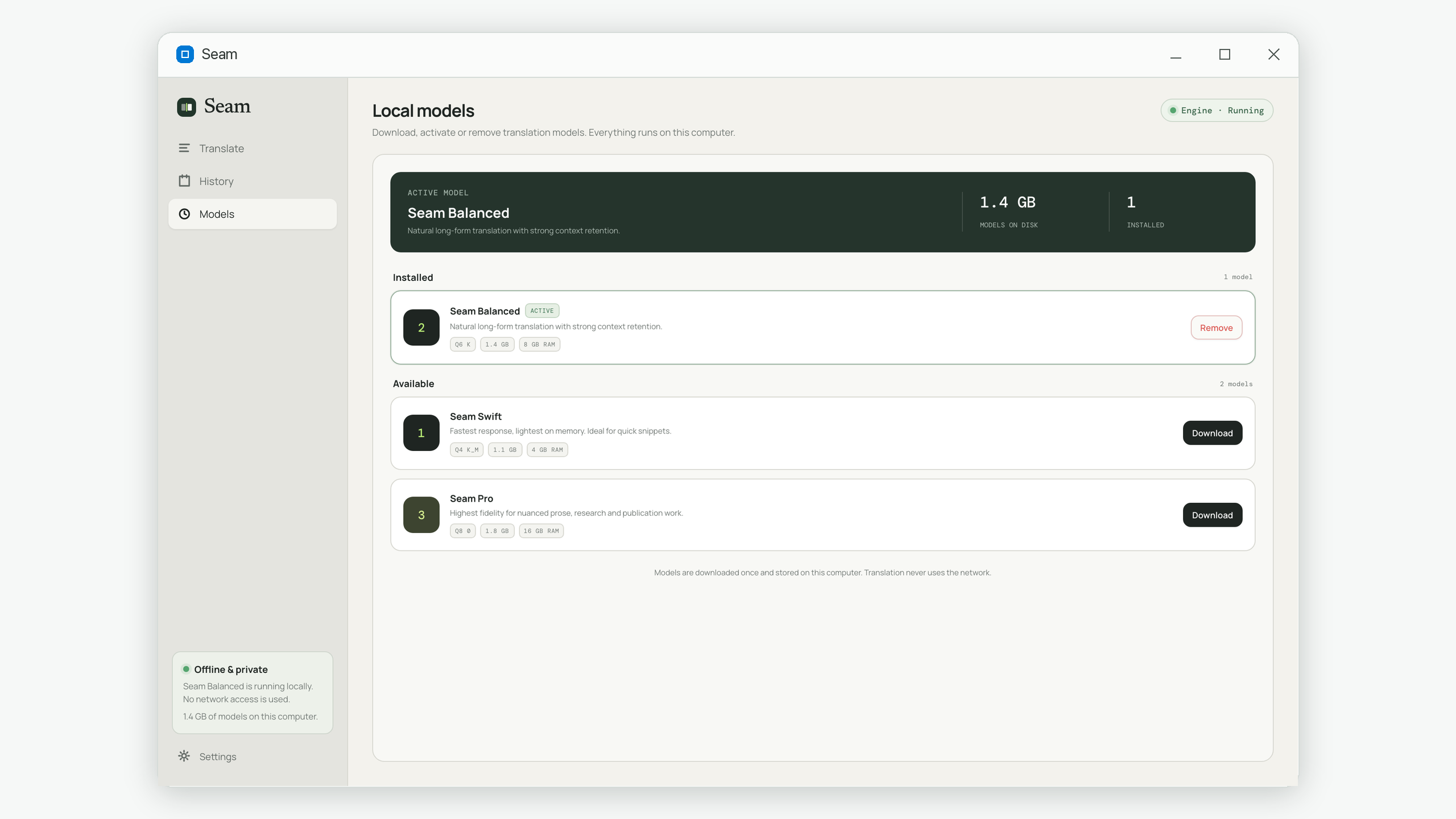
First, download a model. On first run you pick one of three sizes — a faster, lighter one, a balanced one, or a higher-fidelity one for prose headed for publication. This is a one-time download and the only moment the app uses the network at all.
Second, paste the whole thing. Not a section of it — the whole document. There is no character limit and no long-document mode to switch on. Text over the limit is split internally at sentence and line boundaries, and you never see the chunks; you see one source text and one translation.
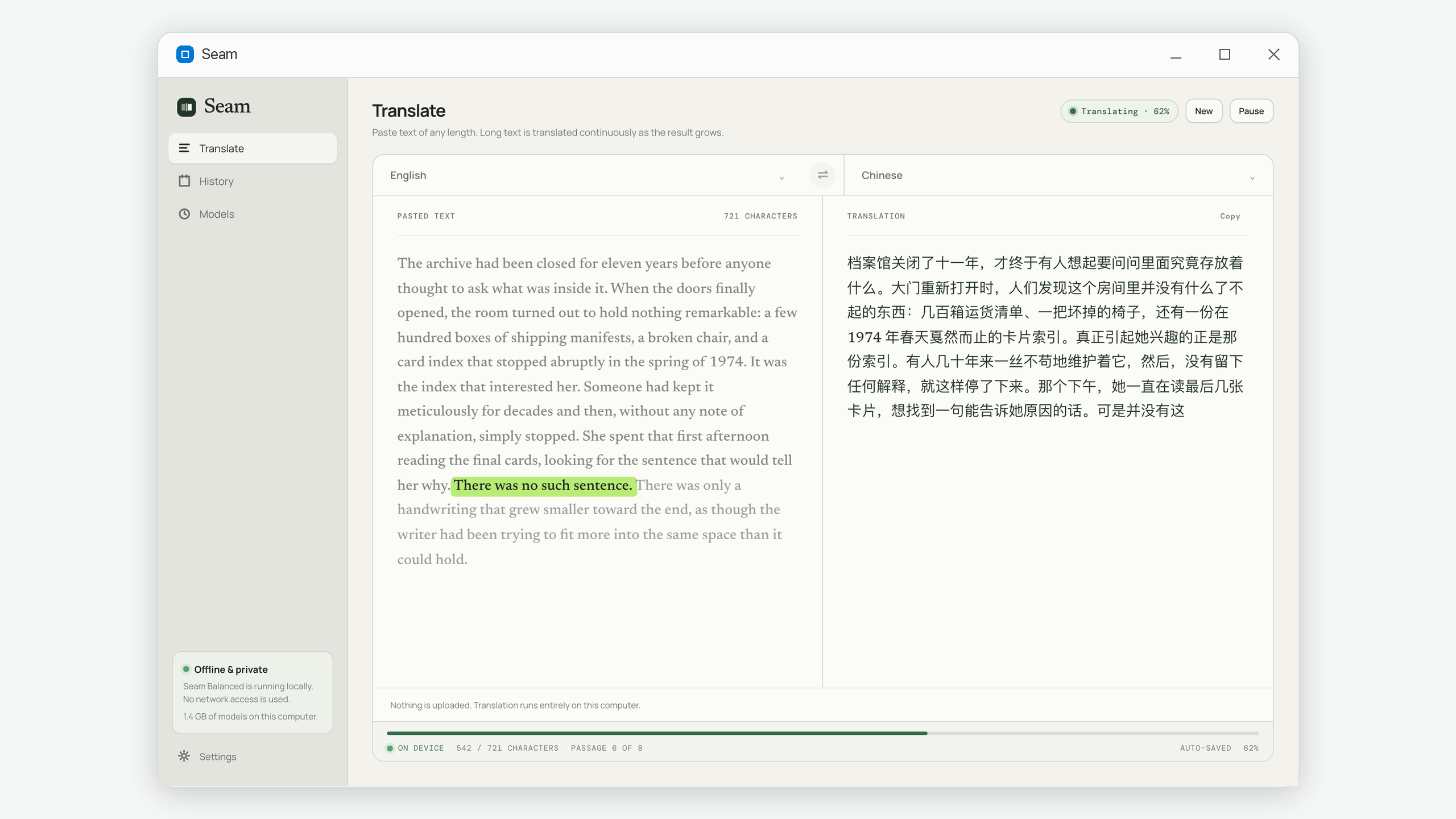
Third, read as it goes. The translation appears progressively rather than arriving all at once at the end, so you can start reading — and start judging whether the tone is right — before a long document has finished. If you close the app halfway through a forty-page job, it resumes where it stopped rather than starting over.
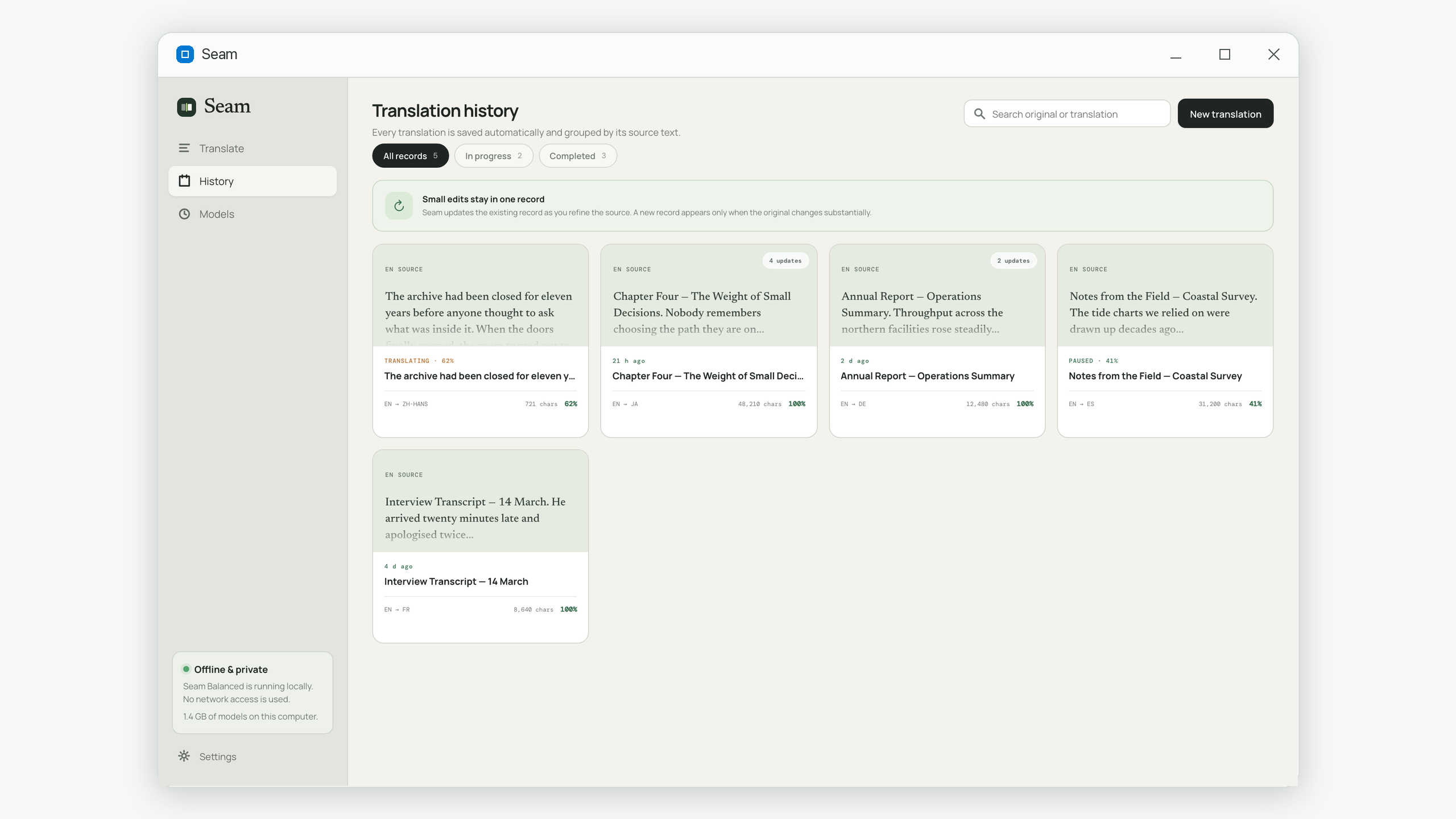
Seam is on the Microsoft Store for Windows. There is no account, no sign-in and no telemetry — which is less a feature than an inevitability, since there is no server to send anything to.
Common questions
Is a local model as good as a cloud translation service?
For comprehension, internal documents, and first drafts, the gap has narrowed to the point where most people would not reliably pick the cloud output in a blind comparison. For text that will be published under your name, in a language you cannot check yourself, you should still have a human review it — and that is true of cloud output too.
Does my computer need to be powerful?
Roughly 8 GB of RAM and an ordinary processor from the last several years. No dedicated graphics card is required. A more capable machine translates faster, but the difference is speed rather than quality.
How large a document can this handle?
There is no fixed cap when the tool splits the text properly — length translates into time rather than failure. A book-length manuscript is a matter of hours running in the background, not something that gets rejected.
Can I translate a PDF or Word file directly?
Seam takes pasted text only, deliberately: file parsing is where a surprising number of documents get silently mangled. Open the document, select all, paste. If your source is a scanned PDF you will need to run it through OCR first, which is a separate job.
Does "offline" mean it stops working if I don't update it?
No. Once the model is on your disk, it is a file on your computer. It does not phone home or require a remote translation service while working.
Seam is a desktop translator that runs entirely on your own computer — any length, no upload, no account. Get it on the Microsoft Store.